



FAQ
How can the Tracki Device location be accessed?
Our system will allow you to view your device(s)
location(s) two ways: via the internet on a browser
on a PC or mobile phone with our web
app. Also through our mobile app which can
be downloaded from the Google
Play Store, or the Apple
App Store.
How far will my Tracki track or locate?
Our system is designed to locate a Tracki Device
anywhere in the world (with NO ADDITIONAL costs or
roaming fees) as long as there is GSM cellular
service area. If the device enters an area without
GSM cellular coverage, the GPS feature will not be
able to report its current location until it
re-enters an area with the network coverage. Once it
reconnects, it will transmit a history of its
locations that you can view online.
What do the lights and sounds mean?
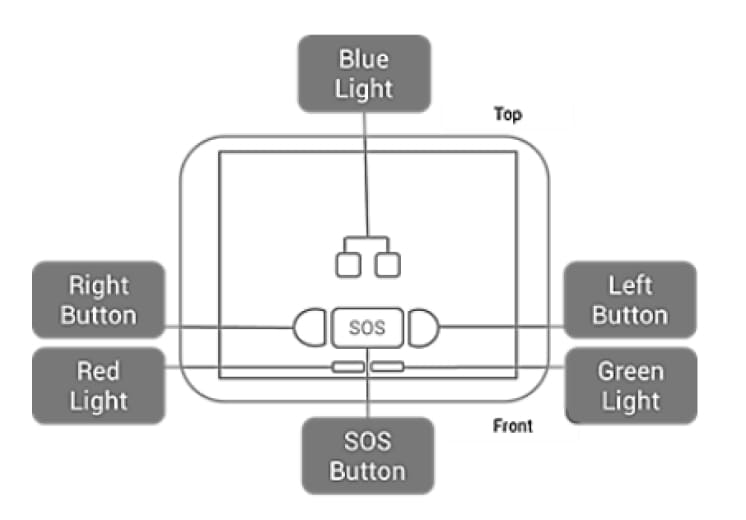
The picture below shows where all the buttons and
lights are located on the device and the table below
shows what causes these lights and sounds to occur.

 Your Tracki device communicates its states via
lights and sounds. The below chart explains the
responses of the lights and sound:
Your Tracki device communicates its states via
lights and sounds. The below chart explains the
responses of the lights and sound:

What's in the box?
The box contains The Tracki GPS tracker which comes
with an embedded international SIM card that works
out of the box in the USA and any country, standard
back plate, magnetic attachment, belt clip
attachment, silicon water-resistant cover, lanyard,
keychain attachment (which is part of the lanyard),
micro USB charging cable, the original rechargeable
battery.
Will my Tracki work anywhere?
Tracki works in 185 countries. Tracki comes with a
built-in SIM and the device is working
out-of-the-box within 5 minutes. No need for a local
SIM card and you cannot change the SIM. It will work
anywhere that you have a GSM cellular signal.
What is GPS?
Global Positioning System (GPS) serves as a
worldwide radio system and was originally developed
and implemented by the U.S. Department of Defense.
GPS is a satellite-based navigation system comprised
of 24 orbiting satellites. GPS works on the
principle that if you know an object’s distance from
several known locations, you can then calculate its
location. The “known” locations are the GPS
satellites, and the distance to the object is
measured using the transit time of an encoded
signal. The satellites also broadcast a data stream
along with the encoded signal to transmit
information about their location. What is a Tracki
device? The Tracki device uses GPS (Global
Positioning System) and cell ID technology to
accurately track the device. It uses the wireless
GSM network to transmit those positions to a
web-based portal where users can view the device
location.
How does the tracker use Wi-Fi?
You don’t need to
connect to a Wi-Fi network in order to track.
Wi-Fi is just a secondary option for the device
to find its location if its GPS signal gets
blocked by a structure or obstacle. Remember,
GPS satellites are high up there in space and
the signal does not always get through
structures so this is where the Wi-Fi detection
kicks in. The tracker will listen for Wi-Fi
networks in the area, much like a phone it can
see all of these networks and the signal
strength. It then sends these network addresses
to the server, which in turn sends back a
location. Please note cellular data connection
is still required as the tracker does not send
or receive data through Wi-Fi, only cellular
data. Again it does not need to know the
password to any specific Wi-Fi for this to
work.
Battery Saver Mode
The battery saver mode will place the device to
sleep and wake up 1-4 times per day, report its
location and go to sleep again to save the
battery.
Please understand that when the tracker goes into this sleep you will lose control of the device. The tracker powers down to conserve battery. Not allowing you to control it remotely. You will have to wait for the device to wake up for any changes in settings or to remove it from the battery saver mode. You will also lose the ability to manually request a location from the device in real-time.
If you use non-stop live tracking mode, then the battery will hold for up to 3-5 days, depending on the tracking frequency (ie. once per min, or up to once per 2 hours) and alert settings.
Please understand that when the tracker goes into this sleep you will lose control of the device. The tracker powers down to conserve battery. Not allowing you to control it remotely. You will have to wait for the device to wake up for any changes in settings or to remove it from the battery saver mode. You will also lose the ability to manually request a location from the device in real-time.
If you use non-stop live tracking mode, then the battery will hold for up to 3-5 days, depending on the tracking frequency (ie. once per min, or up to once per 2 hours) and alert settings.
Can I make a permanent connection to my car power?
Yes, we do have multiple options for this including
the 12 volt wiring kit which allows you to connect
directly to the car battery terminals or any other
connecting 12 volt lines. Also, the OBD 2 cabling
which allows you to plug it straight into the OBD
port in the vehicle.
What is a standard
warranty?
Twelve months for manufacturer-related problems.
This does not include abuse to the device,
accidental damage, or water damage.
I found a Tracki tracker and I
would like to know who is using it?
Under the battery, there is a sticker containing the
device ID. If this sticker was removed and is
missing there's no way we can track back the device
to whoever was using it or purchased it.
Can anyone track my Tracki
Device?
No. When you register your Tracki device on our
tracking application, you will be able to list up to
ten trusted individuals that you want to receive
notifications. You can also designate how you want
them to receive the alerts; either via email (free
service) or text alerts (paid service). You can
change or edit these names at any time. If you want
them to be able to directly track your device, they
would need your log-in and password to access the
web-based service or mobile App.
Why does the accuracy of my
Tracki Device improve over time?
The initial location is the hardest as the Tracki
device is connecting for the first time with four
satellites and figuring out where in the world it
is. Most often this requires taking the device
outside for 5 or more minutes. If activating in a
home you may notice the initial location reported is
approximate to your home but not very accurate. As
your locator continues to gather data outside of the
home and then inside, you will see its accuracy
improve.
What does "plain view" or
"clear view" of the sky mean?
Simply put it means avoiding obstructions that can
block the GPS signal. Avoiding obstructions that
could be blocking the signal can greatly improve the
accuracy and battery life of the tracker. Enclosing
the device in materials such as metal or thick
concrete will block the tracker’s ability to receive
the GPS Signal.
Places not to put your
Tracker in:
- A Metal Toolbox
- Car Trunk
- Car Glove Compartment
- Shipping Container
- Places surrounded by thick concrete
- Places enclosed by metal (under a car is ok, because it’s open on most sides)
Does the Tracki device work the
same in all locations and areas?
No. The Tracki device works best in suburban areas
such as neighborhoods, houses, schools, parks, and
flatter regions. It can receive a GPS signal better
in these areas because there is less obstruction of
the GPS signal. The better line-of-sight the GPS has
to the satellites, the more accurate the position
will be. The Tracki device will work on a limited
basis in cities where there are many high-rise
buildings because the buildings decrease line of
sight to the GPS signal causing errors in
positioning.
What is the accuracy of the GPS
in the Tracki Device?
Though there are restrictions placed by the
military, today’s GPS receivers are extremely
accurate thanks to their parallel multi-channel
design. The Tracki device is usually accurate within
15 meters (~50 feet). Certain atmospheric factors
and other sources of error may affect the accuracy.
Due to the technological limitations of the GPS satellites’ signals, we cannot guarantee that the GPS device will work 100% of the time. GPS signals connections may experience downtime, interruptions, or dead spots.
Due to the technological limitations of the GPS satellites’ signals, we cannot guarantee that the GPS device will work 100% of the time. GPS signals connections may experience downtime, interruptions, or dead spots.
Why does my device keep bouncing
around on the map?
Please understand that the app is being fed data
from the device, and the device is obtaining its
data from the radio waves in the air.
In the case of GPS satellites, the signal is quite often being reflected by objects such as trees or buildings and therefore it jumps around. Understand whatever data the GPS receiver is getting, this is what it's transferring to our servers and then displaying on the app. There is nothing wrong with the app, and is just the nature of radio waves when they are unstable and bouncing.
If the tracking is coming from Wi-Fi (Wi-Fi is an alternative to GPS whenever the device is indoors or GPS signal is being hidden), the same thing happens. There may be few Wi-Fi routers in the area and their signal strength is altering based on reflections for objects moving and therefore each time the GPS tracker is receiving a stronger signal from one of these Wi-Fi's compared to the other it seems like it's bouncing from location to location on the map in the app.
For a tracker that is constantly bouncing around, ensure that signal is not being blocked somehow. Placing the device in the trunk or anywhere that it is fully surrounded by metal can cause this problem. The best way to fix this is to try and place the device in a different spot and see if the issue still occurs. If it does please contact us right away so we can look into it for you.
In the case of GPS satellites, the signal is quite often being reflected by objects such as trees or buildings and therefore it jumps around. Understand whatever data the GPS receiver is getting, this is what it's transferring to our servers and then displaying on the app. There is nothing wrong with the app, and is just the nature of radio waves when they are unstable and bouncing.
If the tracking is coming from Wi-Fi (Wi-Fi is an alternative to GPS whenever the device is indoors or GPS signal is being hidden), the same thing happens. There may be few Wi-Fi routers in the area and their signal strength is altering based on reflections for objects moving and therefore each time the GPS tracker is receiving a stronger signal from one of these Wi-Fi's compared to the other it seems like it's bouncing from location to location on the map in the app.
For a tracker that is constantly bouncing around, ensure that signal is not being blocked somehow. Placing the device in the trunk or anywhere that it is fully surrounded by metal can cause this problem. The best way to fix this is to try and place the device in a different spot and see if the issue still occurs. If it does please contact us right away so we can look into it for you.